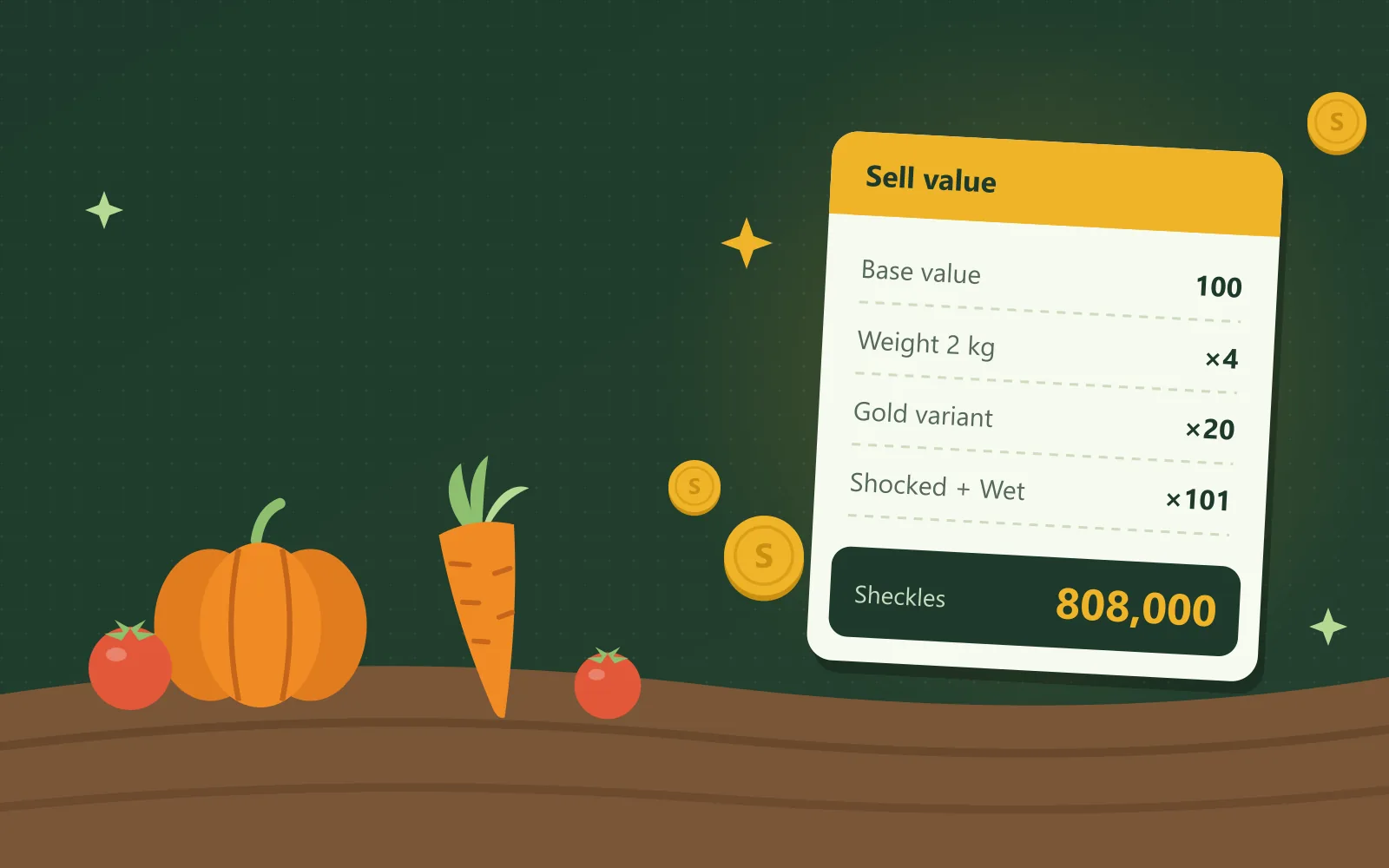
Use this Grow a Garden calculator to find the exact sell value of any crop in the Roblox game. Results appear in sheckles, the in-game currency you receive when you sell a harvested crop. Choose a crop, enter its weight and special effects, and the calculator displays the total amount.
How does the Grow a Garden calculator work?
The Grow a Garden calculator works as a fruit value and price calculator, combining every detail of your crop into one sell price. Each field updates the result automatically, so you never need to press a separate calculate button.
Follow these steps to price any crop accurately:
- Pick your crop from the list, or sort the list so the most valuable crops appear first.
- Enter the weight in kilograms (kg) that the game displays after you harvest the crop.
- Choose one variant, which is a rare color version of the crop such as Silver, Gold, Diamond or Rainbow.
- Add every mutation on the crop, meaning each special effect from weather, events or pets that increases its price.
- Set the quantity when you plan to sell several identical crops at the same time.
- Move the friend boost slider to match the extra bonus you receive from friends in your server.
Only one variant can apply to each crop, but a crop can carry many mutations at once. For example, if you select Gold and then Rainbow, the calculator automatically replaces Gold with Rainbow.
Use the search box and the category tabs, including Fusions, to locate any mutation quickly. Some mutations only appear during admin events, which are special live events run by the game's developers. Tick Hide admin-only mutations to remove them from the list until you actually need them.
Switch to Find weight to work from value to weight instead of weight to value. Type the sheckle amount you want, and the calculator shows the minimum weight your crop needs to reach it.
The result panel explains every step of the calculation underneath the total. You can then add the crop to a harvest list, copy the result, or share a link with other players.
To check what a pet is worth in a trade, open the values and trade calculator.
Pet weight calculatorIf you need to estimate how heavy a pet will grow, use the pet weight calculator instead.
What each pet doesOr open the pet ability calculator to see what each pet does at its weight.
How is crop value calculated in Grow a Garden?
Crop value in Grow a Garden equals the base value multiplied by the weight, variant, mutation and friend boost multipliers. The calculator then multiplies that price by your quantity to give the total.
Each variant applies one fixed multiplier to the entire crop price. Gold multiplies the price by 20, not 25.
| Variant | Multiplier |
|---|---|
| Normal | ×1 |
| Silver | ×5 |
| Gold | ×20 |
| Diamond | ×50 |
| Rainbow | ×50 |
- 1The crop weighs 2 kg, so the weight multiplier is (2 ÷ 1)² = 4.
- 2The Gold variant then multiplies the resulting price by 20.
- 3Shocked and Wet together give a mutation multiplier of 101.
- =The final sell value is 100 × 4 × 20 × 101 = 808,000 sheckles.
What does base value mean in Grow a Garden?
- Base value
- Base value is the starting plant value of a Grow a Garden crop, meaning its price at normal weight without a variant or mutations. Every crop has its own base value, and the calculator stores each one so you never look it up.
- Base weight
- Base weight is the normal weight of a crop in kg. A crop only earns an extra weight bonus when it grows heavier than this amount.
How do you calculate the weight of a crop?
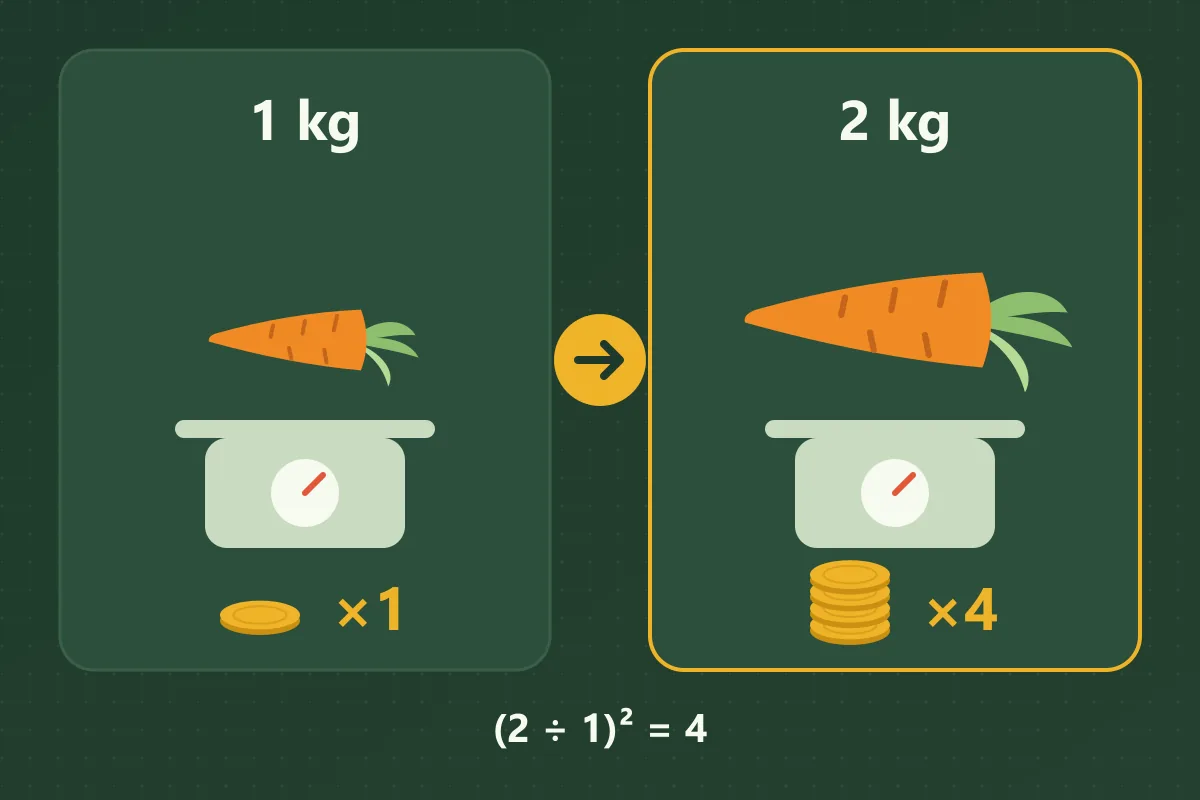
You find the weight of a crop by holding it after harvest, where the game displays its exact weight in kg. The calculator then converts that number into a weight multiplier for you.
To calculate the weight multiplier, divide the crop's weight by its base weight and square the answer. Squaring simply means multiplying a number by itself.
Weight raises the price faster than many players expect, because the effect is squared rather than added. For example, a crop at double its base weight sells for four times as much, not twice as much.
A crop that weighs less than or exactly its base weight keeps a weight multiplier of 1. As a result, lighter crops never sell for less than their original base value.
How do mutations affect crop value?
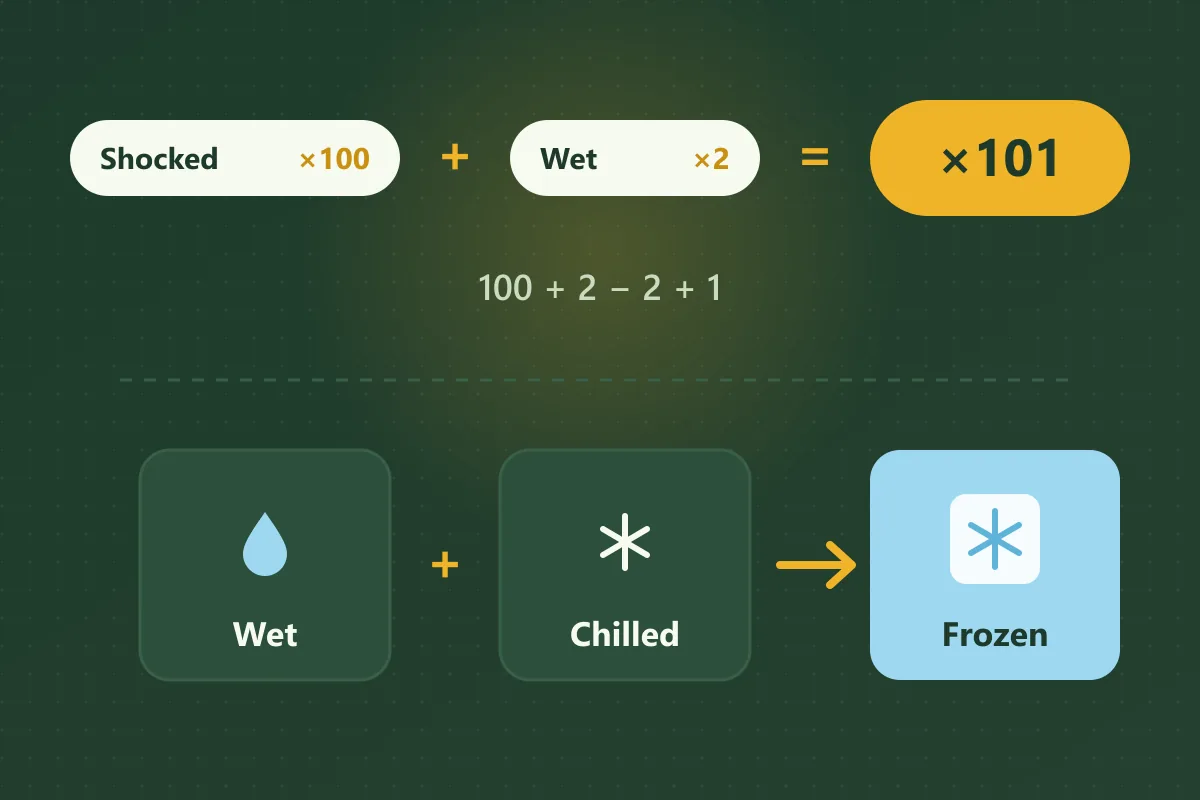
Mutations raise crop value through one shared multiplier: add every mutation's multiplier together, subtract the number of mutations, and then add 1. The calculator on this page handles this step for you as soon as you select each mutation.
For example, Shocked is worth 100 and Wet is worth 2, not 5. The correct total is 100 + 2 − 2 + 1 = 101, while multiplying them would wrongly give 200.
- Some mutations fuse into a stronger mutation when they appear on the same crop. For example, Wet or Drenched with Chilled fuse into Frozen, and the calculator performs that swap automatically.
- Other mutations can never exist together on one crop, such as Moonlit and Bloodlit. When you add one of them, the calculator removes the other and explains the reason.
- A few multipliers carry a One source or Sources differ label, and the result notes which value it used. To compare all 192 mutations and every fusion rule, open the mutation calculator.
Why does the calculator not match the game exactly?
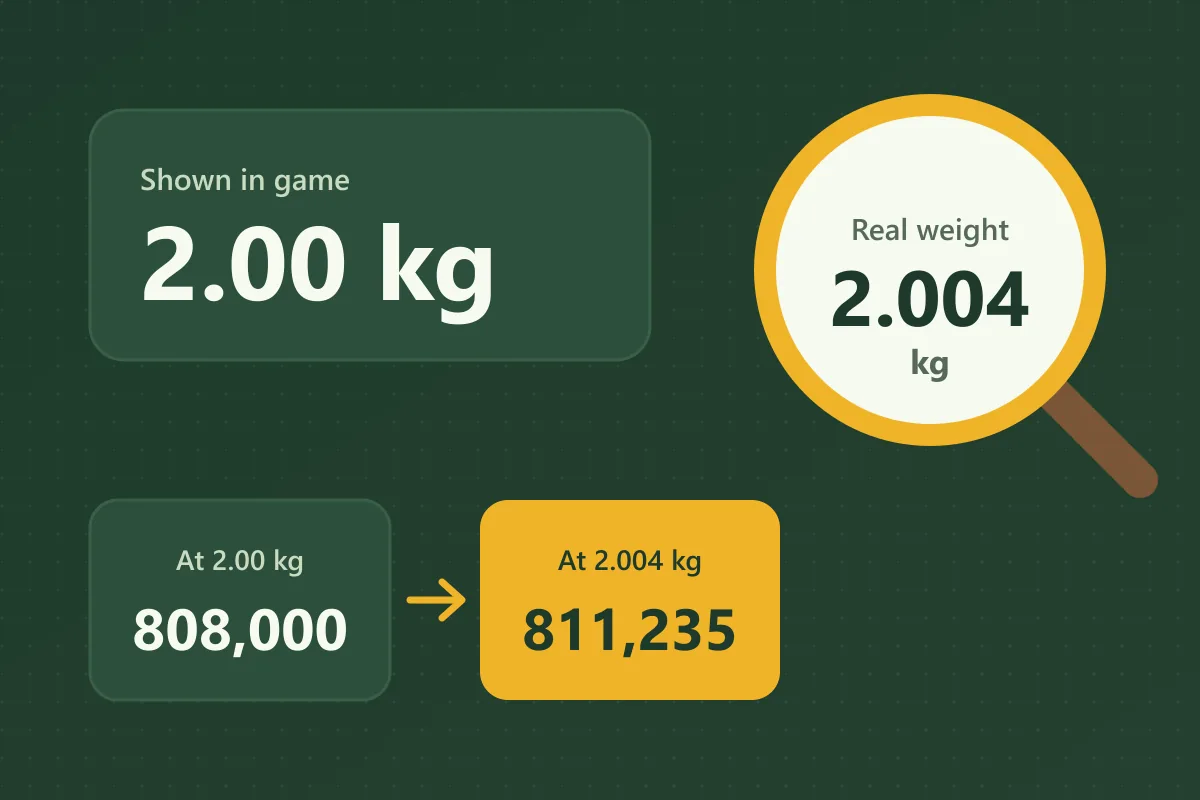
The calculator can differ slightly from the game when the game rounds the weight it displays. The real weight usually has extra decimal places, so the calculator starts from a slightly different number.
For example, a crop displayed as 2.00 kg might actually weigh 2.004 kg. Using the sample crop from the worked example above, that hidden difference raises the price from 808,000 to about 811,235 sheckles.
The gap looks bigger on heavily mutated crops because every multiplier enlarges the small weight difference. Light crops also show bigger gaps, since a tiny rounding change is a larger part of their weight.
Follow these steps when your result does not match the game:
- Add a third decimal place to the weight, then adjust it up or down by 0.001 kg until the totals match.
- Check that you selected every mutation on the crop, including any fused mutation.
- Confirm that you chose the correct variant, because a wrong variant changes the price a lot.
- Look at the date the crop values were last updated, which appears under the page title.
If the result still looks wrong, use the report link underneath the result. Every report helps keep the crop values accurate for other players.
What is the Grow a Garden game currency?
The main currency in Grow a Garden is sheckles, which you receive by selling your harvested crops. You then spend sheckles on seeds, gear and other valuable equipment from the in-game shops.
Every price in the game appears in sheckles, so this GAG calc displays its results in sheckles too. As a result, you can compare the calculator's total directly against the amount the game actually pays you.
How much is 1 Qa, Qi or Sx in Grow a Garden?
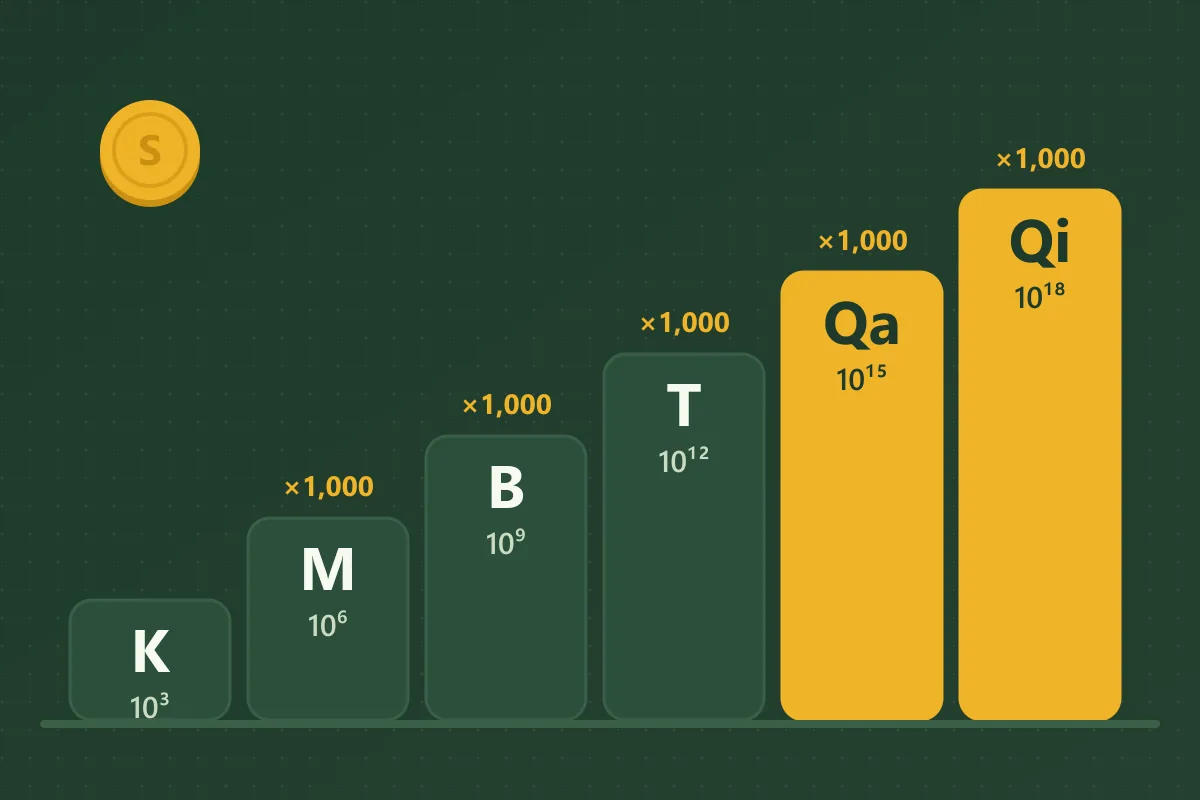
1 Qa equals one quadrillion sheckles, which is a 1 followed by 15 zeros. The game shortens enormous numbers with letter suffixes, and each suffix represents a fixed amount.
- KThousand3 zeros after the 1
- MMillion6 zeros after the 1
- BBillion9 zeros after the 1
- TTrillion12 zeros after the 1
- QaQuadrillion15 zeros after the 1
- QiQuintillion18 zeros after the 1
- SxSextillion21 zeros after the 1
- SpSeptillion24 zeros after the 1
- OcOctillion27 zeros after the 1
- NoNonillion30 zeros after the 1
- DcDecillion33 zeros after the 1
Each suffix is exactly 1,000 times greater than the previous abbreviation in the sequence. For example, 1 Qa equals 1,000 T, and 1 Qi equals 1,000 Qa.
Many players confuse Qa and Qi because both abbreviations begin with the same letter. Qa always represents quadrillion, while Qi represents quintillion, which is a thousand times larger.
To read a complete price, multiply the number in front by the value of its suffix. For example, 2.5 Qa means 2.5 quadrillion, which written in full is 2,500,000,000,000,000 sheckles.
When was Grow a Garden made?
Grow a Garden was released on Roblox on . It is a free-to-play farming game where you plant seeds, grow crops and sell your harvest.
This Roblox Grow a Garden calculator, often shortened to grow a garden calc, works for the original game only. Grow a Garden 2 is a separate sequel with different mutation rules, so its crop prices follow another formula.
This Grow a Garden calculator is a free fan-made tool. It is not made by, endorsed by or connected to Roblox or the Grow a Garden developers.